Most of my career has been spent on software that runs inside a car: tight memory, hard deadlines, one ECU, no network. But more and more of what a modern car does depends on systems that live far away from it: servers that deliver software updates, collect diagnostics, and keep a digital twin of every vehicle in the fleet. Those systems obey a completely different set of rules, and the discipline that deals with them is called system design.
This is the first post in a short series about system design for engineers who, like me, mostly come from the embedded side. Instead of listing patterns in the abstract, I will build one realistic system step by step: a server that delivers a software update to a million cars. Each time the design breaks, we add one building block and see what problem it solves.
The series:
- The building blocks (this post): load balancer, replication, cache, CDN, message queue.
- Where systems break: finding the bottleneck, latency numbers and queueing.
- Scalability explained simply: horizontal scaling, statelessness, sharding and why consistency is hard.
If you prefer to learn from video, Alex Xu’s ByteByteGo channel explains many of these concepts with excellent animations; I list some starting points at the end. The numbers and the example system in this post are my own and are illustrative. For the question of whether to split such a system into services, see Microservices vs Monolith.
The example: one update, a million cars
Over-the-air (OTA) updates are no longer a luxury. In Europe, UN Regulation No. 156 requires carmakers to run a certified software update management system, and the UK Vehicle Certification Agency lists it as applying to new vehicle types from July 2024 and, under the same conditions, to new vehicles from July 2026. Behind every OTA campaign there is a backend that has to answer one question millions of times: is there an update for this car, and where do I download it?
Let us size the problem with a back-of-the-envelope calculation, the most underrated tool in system design. Assumptions, all illustrative:
- 1,000,000 cars in the fleet;
- 1 GB update package per car;
- every car checks in once an hour while it is in use;
- the carmaker wants the rollout finished within 7 days.
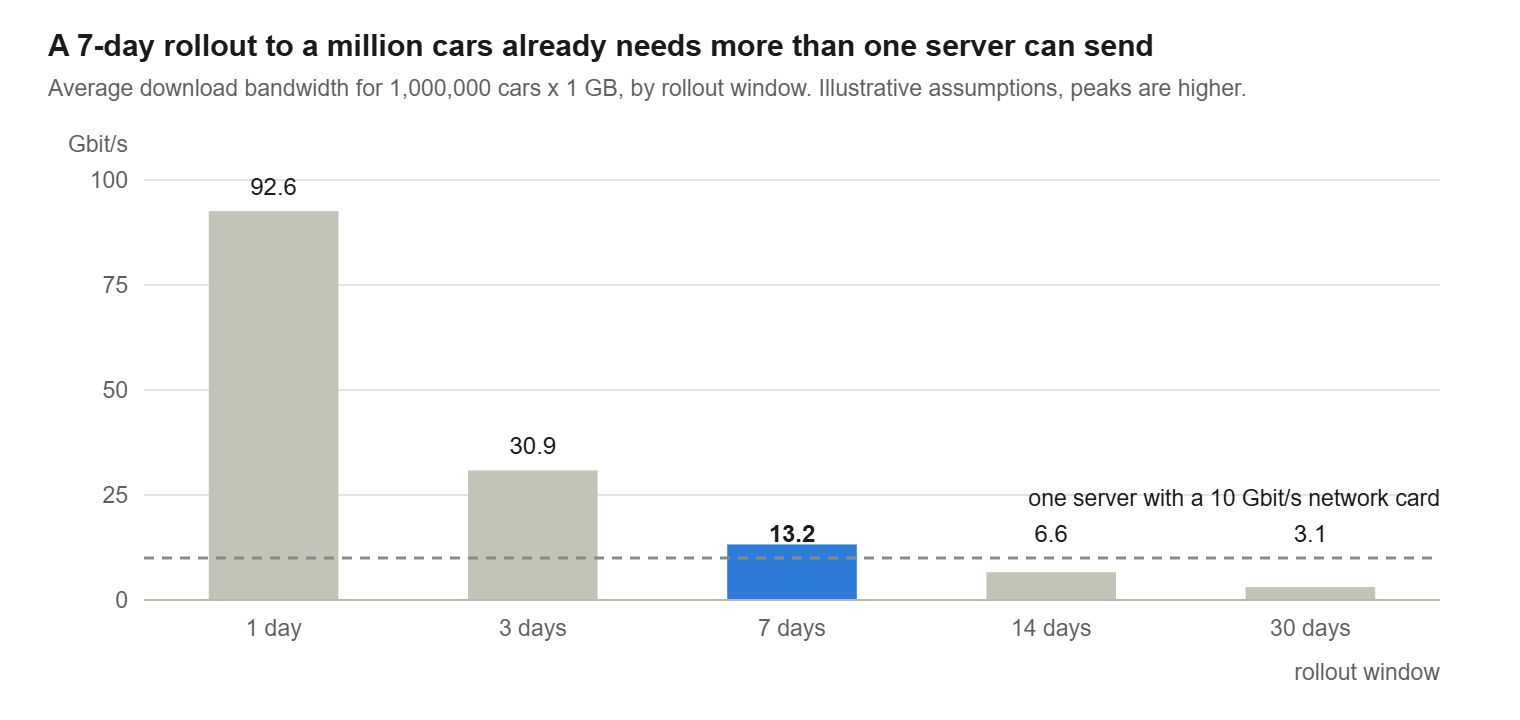
That is 1 petabyte of data to deliver. Spread evenly over 7 days, it needs about 13 Gbit/s on average, all day and night. Real traffic is not even: most cars are parked and switched off at night and connect in the morning and evening, so the peak can easily be several times the average. One server with a 10 Gbit/s network card is already not enough, and that is before a single database query.
The chart below shows how the required bandwidth depends on how fast you want the rollout done. The check-ins are a second, very different load: around 280 small requests per second on average if every car checked in hourly around the clock, many more in rush hour. Small requests, huge files: the two loads will need two different solutions.
Version 1: one server
Every system starts simple, and it should. Our first version is one machine running three things: a web application that answers check-ins, a database with the list of vehicles, their software versions and the campaigns, and a folder of update packages on the local disk.
A car connects, says “I am VIN 123, running version 4.2”, the application looks up the campaign in the database and replies “version 4.3 is available, download it from /packages/4.3.bin”. The car then downloads the file from the same machine.
For a pilot with 500 test cars, this is perfect: cheap, easy to debug, one thing to monitor. For a million cars it fails in four ways at once:
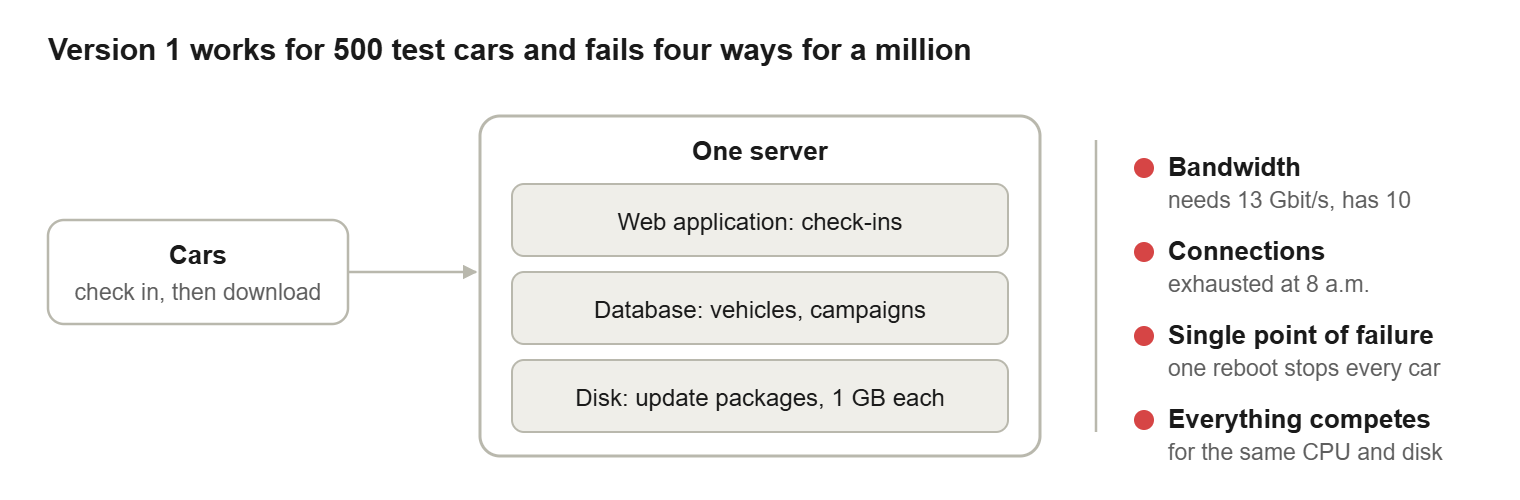
- Bandwidth. As we just calculated, the downloads alone need more than one network card can carry.
- CPU and connections. Thousands of cars connecting at 8 a.m. exhaust the server’s threads and connections, and check-ins start timing out.
- Single point of failure. If the machine reboots for a kernel patch, every car in Europe gets an error.
- Everything competes. A large download, a database query and a check-in all fight over the same CPU, memory and disk.
The rest of this post fixes these problems one building block at a time.
Building block 1: load balancer and stateless servers
The obvious fix for “one machine is not enough” is more machines. The question is how cars find them. The answer is a load balancer: one address that the cars talk to, which spreads the requests across a pool of application servers behind it. Common strategies are round robin, least connections, or hashing on some key.
The load balancer also gives us health checks. It asks every server “are you alive?” every few seconds and stops sending traffic to one that does not answer. A server can now be patched, crash or be replaced without a single car noticing.
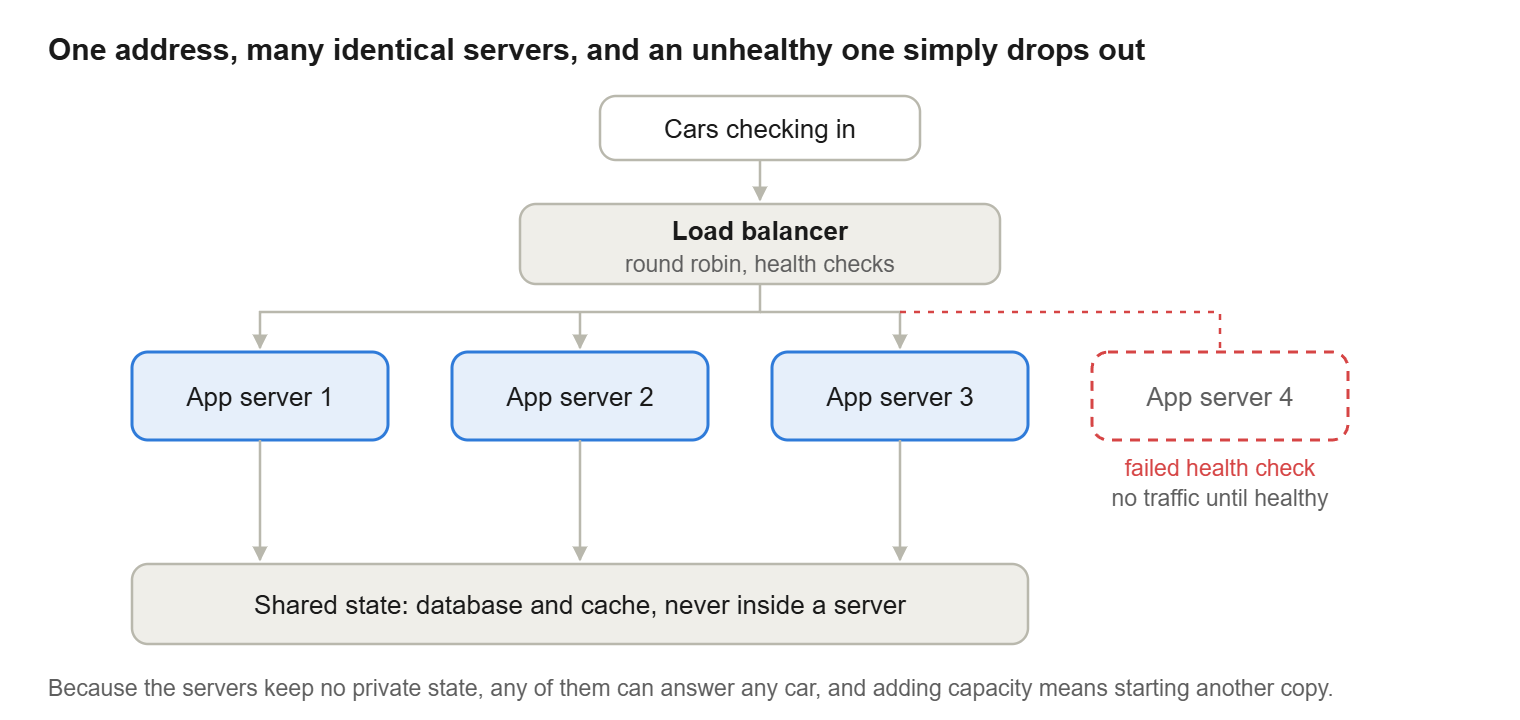
This only works if the application servers are stateless: any server must be able to answer any car. If server A keeps a car’s session in its memory and the next request lands on server B, B knows nothing about it. So state moves out of the servers, into the database or a shared cache, and the servers become interchangeable copies. Adding capacity is then as simple as starting another copy. That is horizontal scaling, and Part 3 of this series goes deeper into it.
In embedded terms: think of the load balancer as a dispatcher in front of identical worker tasks. Nobody cares which worker handles a job, as long as none of them hides private state that another one would need.
Building block 2: database replication
We now have ten stateless application servers, and all of them hit the same database. The database has become the new single point of failure and, soon, the new bottleneck.
Look at the traffic pattern. Almost every check-in is a read: which campaign applies to this car? Only a few requests are writes: “update installed successfully”, or a new campaign created by an engineer. That shape is perfect for primary–replica replication:
- one primary database accepts all writes;
- several replicas receive a continuous copy of the primary’s changes and serve reads;
- if the primary fails, one replica is promoted to take its place.
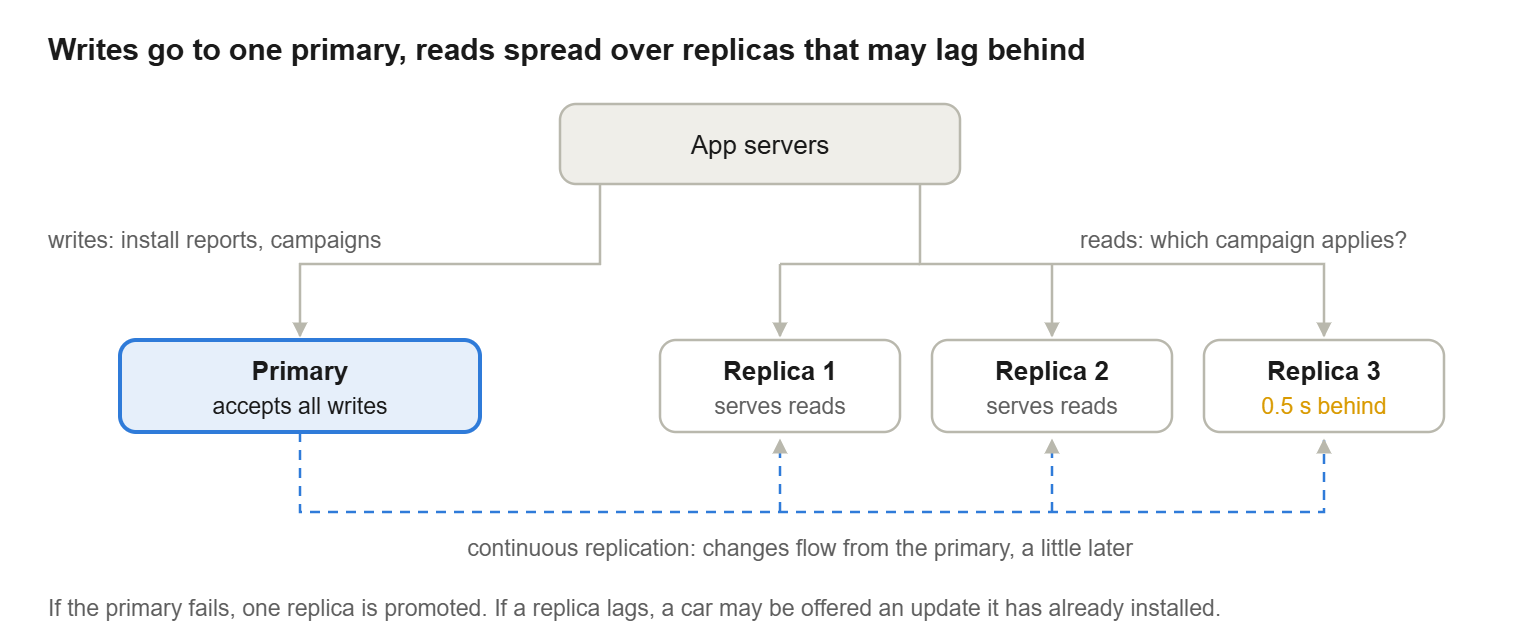
Reads now scale by adding replicas, and the system survives the loss of a database machine. The price is replication lag. A replica may be a fraction of a second, or in bad moments several seconds, behind the primary. If a car reports “installed 4.3” to the primary and its next check-in reads from a lagging replica, the backend may still think the car is on 4.2 and offer the update again.
The usual fixes are pragmatic: read a car’s own recent writes from the primary, make the update offer idempotent so that offering it twice does no harm, and let the car itself be the final authority on what it has installed. This is the first appearance of a theme that runs through the whole series: once data lives in more than one place, you have to decide how stale it is allowed to be.
Building block 3: cache
Even with replicas, most check-ins ask the database the same question. On a given day there may be a handful of active campaigns for a few dozen vehicle variants, but a million cars asking about them. Asking the database every time is wasteful.
A cache keeps the answers to frequent questions in memory, in a fast key-value store such as Redis or Memcached, or simply inside each application server. A check-in first asks the cache “what is the current campaign for variant X, software 4.2?”. On a hit, the answer comes back in well under a millisecond and the database is never touched. On a miss, the server asks the database and puts the answer in the cache for next time. This pattern is called cache-aside.
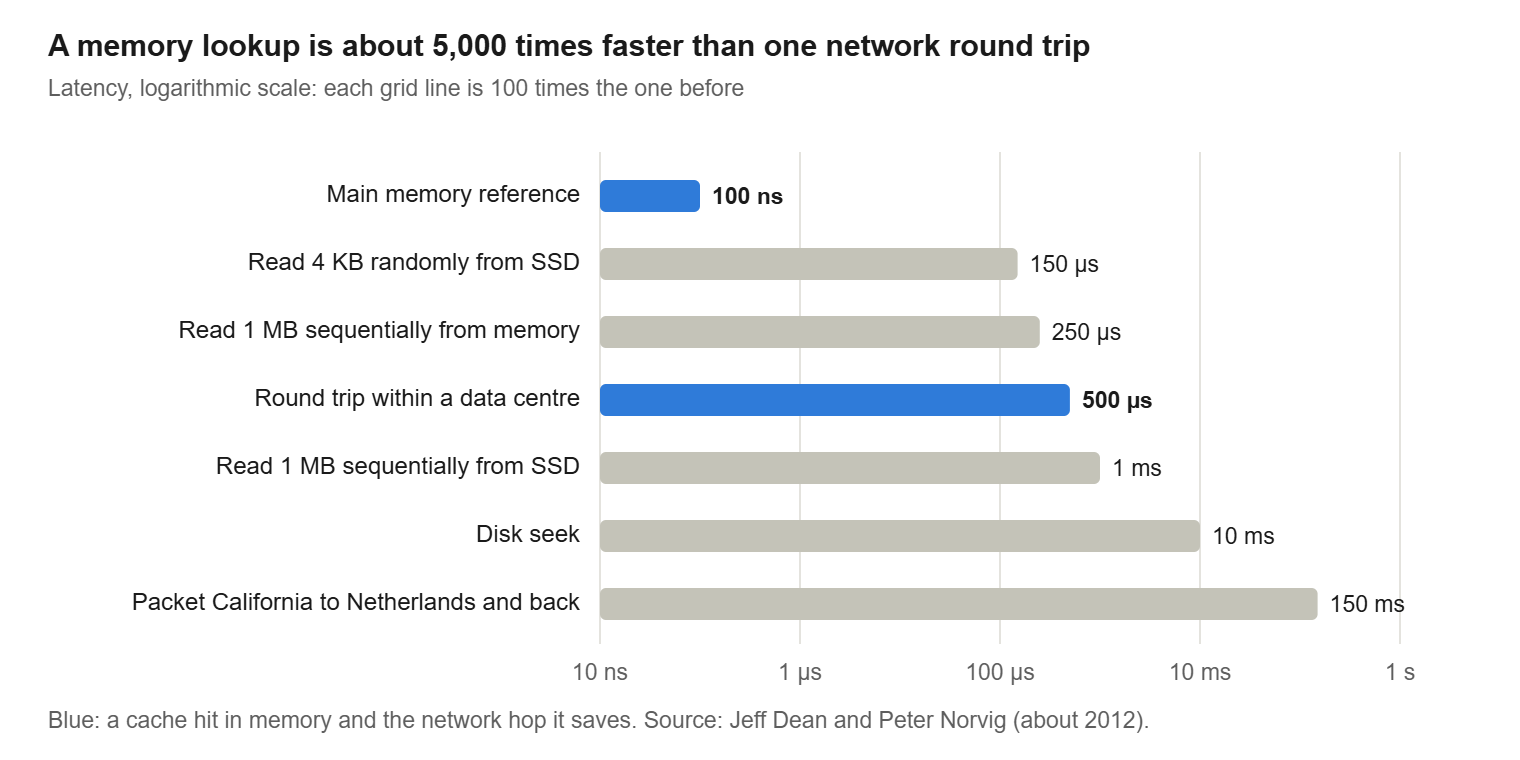
Why it matters so much becomes clear from the classic “latency numbers every programmer should know” list, attributed to Jeff Dean and Peter Norvig. The chart below shows a few of them on a logarithmic scale. A main memory reference (100 ns) is about 5,000 times faster than a network round trip inside a data centre (0.5 ms), and a packet from California to the Netherlands and back takes 150 ms, another 300 times longer.
Caches come with the oldest joke in computer science attached: the two hard problems are cache invalidation and naming things. When an engineer pauses a campaign because the first cars reported a problem, every cached “yes, update available” answer must disappear quickly. Typical answers are short time-to-live values (for example 60 seconds), explicit invalidation when a campaign changes, or both. For an OTA backend, being able to stop a rollout fast is a safety feature, so the cache design must make that possible.
Building block 4: object storage and a CDN for the big files
We have solved the small requests. The big problem is still the 1 GB downloads, the 13 Gbit/s average from the first section. No sensible application server should be streaming gigabytes; that is not what it is for.
The fix has two parts:
- Object storage (Amazon S3, Azure Blob Storage, Google Cloud Storage and similar) holds the update packages. It is built for large, immutable files, stores them redundantly and scales without anyone managing disks.
- A content delivery network (CDN) puts copies of those files on servers close to the cars: hundreds of edge locations spread across countries and network providers. The first car in Munich that downloads version 4.3 pulls it to the Munich edge; the next thousand cars in Bavaria get it from there.
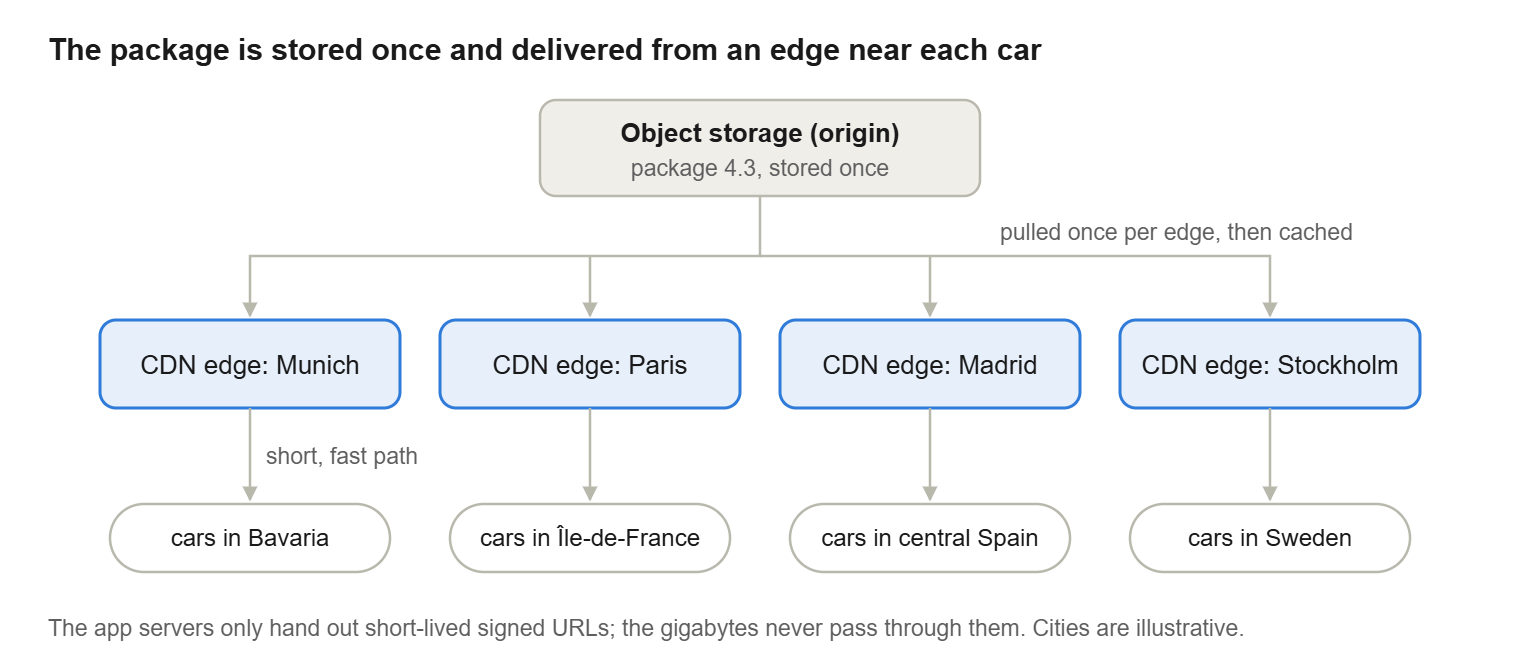
The check-in response no longer says “download it from me”. It returns a URL on the CDN, usually a signed URL that is only valid for this car and for a limited time, so that nobody else can fetch the package. The application servers now only exchange a few kilobytes per car, and the heavy lifting is done by infrastructure built for exactly that.
Update packages are an ideal CDN workload because they never change: version 4.3 is version 4.3 forever. Immutable files can be cached aggressively, and integrity is checked by the car with a cryptographic signature anyway. In real OTA systems, the files are often also made smaller with delta updates, which send only the difference between the old and the new image.
Building block 5: message queue and workers
After installing, each car sends a report: “VIN 123 installed 4.3, success, took 14 minutes”, or “failed at step 3, rolled back”. Those reports trigger work: update the vehicle record, recalculate campaign statistics, maybe open a ticket, maybe notify the owner’s app.
If the check-in server does all of that before answering, two bad things happen. The car waits for work it does not care about, and a slow downstream system (say, the ticketing tool) makes the whole check-in path slow.
A message queue (Kafka, RabbitMQ, Amazon SQS and similar) decouples the two. The application server writes the report into the queue, answers the car with “received” in milliseconds, and moves on. A pool of workers reads from the queue and does the heavy processing at its own pace.
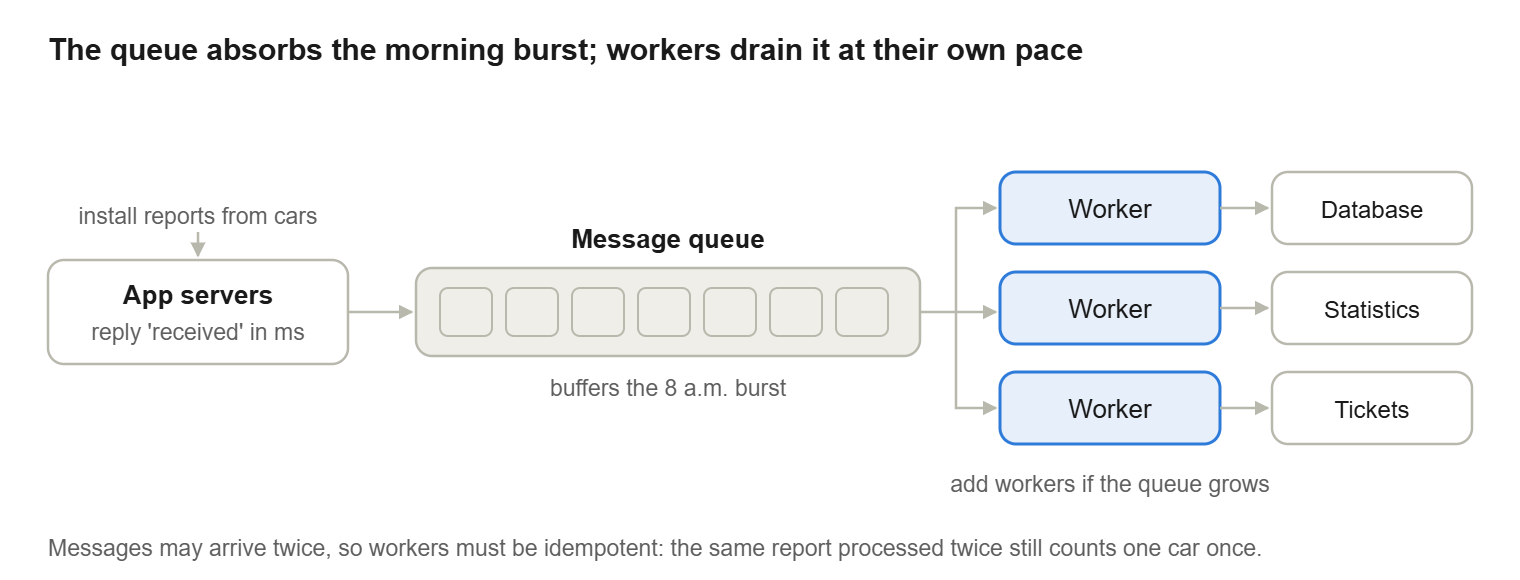
Three properties make this powerful:
- Buffering. On the morning a campaign starts, reports arrive in a burst. The queue absorbs the spike and the workers drain it over the next minutes, instead of the database collapsing at 8:05.
- Independent scaling. If reports pile up, add workers; the check-in servers do not change.
- Resilience. If the statistics service is down for ten minutes, messages wait in the queue instead of being lost.
The price is asynchrony. The campaign dashboard may show a success rate that is a minute old, and messages can be delivered more than once, so workers must be idempotent: processing the same report twice must not count the car twice. Engineers who have written interrupt handlers that hand work to a background task will recognise the idea immediately: acknowledge fast, process later.
The full picture: the path of one update
Put the five building blocks together and follow one car through an update. The numbers match the drawing below.
- The car checks in with the load balancer, which picks a healthy application server.
- The application server asks the cache for the current campaign of this vehicle variant.
- On a cache miss, it reads from a database replica and fills the cache.
- It answers with a short-lived signed URL for the package.
- The car downloads the package from the nearest CDN edge, which fetches it from object storage only the first time.
- After installing, the car sends its report, which the application server drops into the message queue.
- Workers process the report and write the result to the primary database, which replicates it to the replicas.
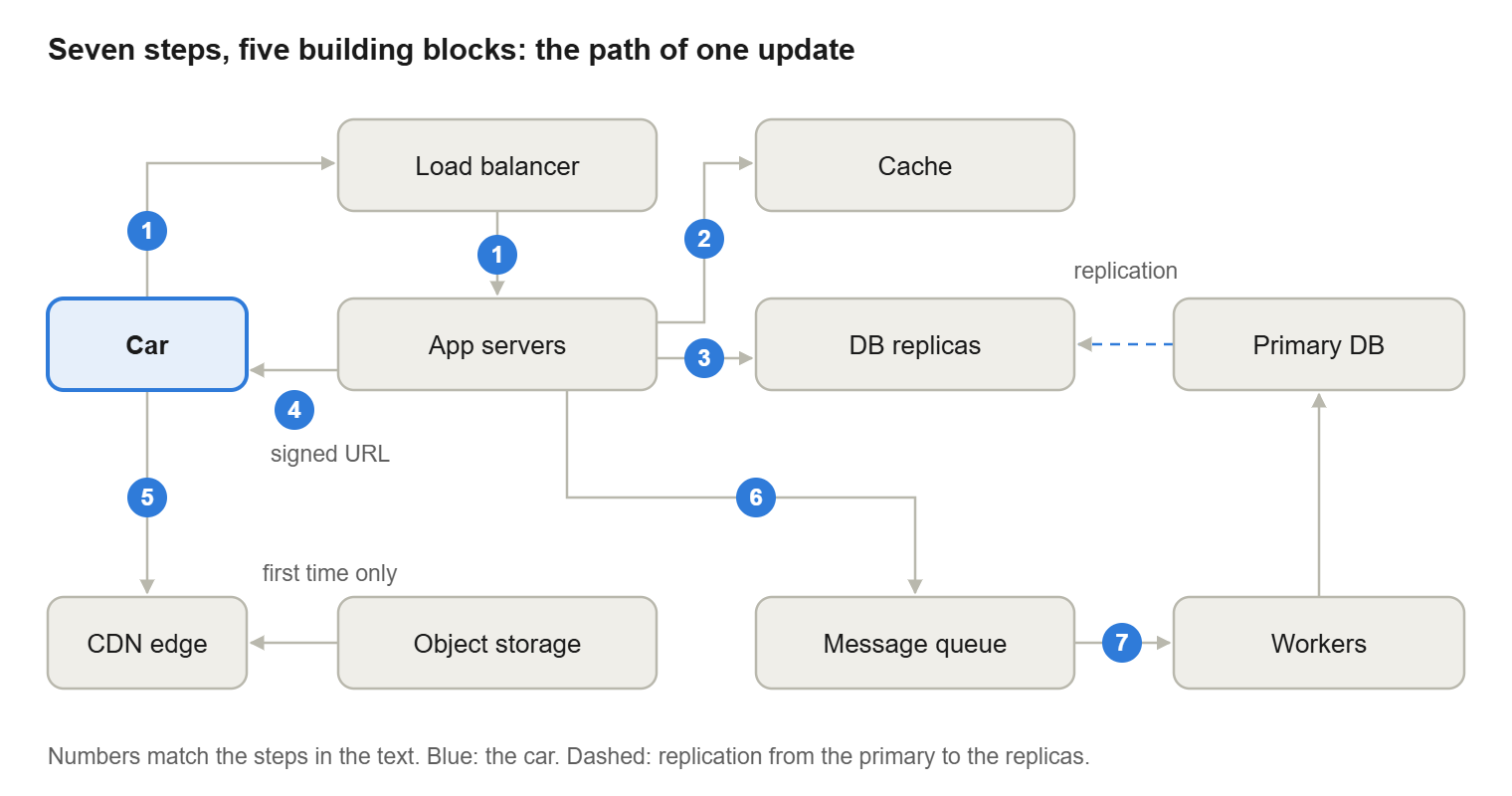
Notice how each part does one job and can be scaled on its own: more application servers for check-ins, more replicas for reads, the CDN for bandwidth, more workers for reports. Notice also what the design deliberately gives up: the dashboard is a little behind, a replica can be a little stale, and a rollout can be paused only as fast as the cache forgets. Those trade-offs are the heart of system design, and the next two posts look at them more closely.
What I take away
- Do the arithmetic first. Five minutes of back-of-the-envelope numbers told us that bandwidth, not CPU, is the real problem.
- Separate the small from the big. Check-ins and downloads have completely different shapes; giving each its own path is half of the design.
- Stateless servers make everything else easy. Load balancing, scaling and failover all depend on it.
- Every copy of data is a consistency decision. Replicas, caches and queues all trade freshness for speed or resilience. Decide consciously how stale is acceptable.
- Design the stop button. For OTA, the ability to pause a rollout quickly matters more than shaving milliseconds off a check-in.
- Embedded instincts transfer. Dispatchers, buffers, interrupt-then-defer and worst-case thinking are the same ideas at a different scale.
Further watching and reading
If you want the same building blocks explained with animations, these ByteByteGo videos are good starting points:
- 8 Most Important System Design Concepts You Should Know
- What is a Load Balancer Really About?
- How Key-Value Stores Work (Redis, DynamoDB, Memcached)
- System Design: Why is Kafka Popular?
- Scalability Simply Explained in 10 Minutes, a good preview of Part 3
For reading, ByteByteGo’s free System Design 101 repository collects their diagrams, and Alex Xu’s System Design Interview books go deeper. Martin Kleppmann’s Designing Data-Intensive Applications is the book to read once you want to understand why replication and consistency are so hard.
Sources
- UK Vehicle Certification Agency, Cyber Security and Software Updating (UN R155 and R156)
- EUR-Lex, UN Regulation No. 156 on software update management systems
- Latency Numbers Every Programmer Should Know (Jeff Dean, Peter Norvig), gist by Jonas Bonér
- ByteByteGo on YouTube and System Design 101
- Microservices vs Monolith: How to Choose Without the Hype
The OTA backend, its numbers and its design are a simplified, illustrative example, not a description of any carmaker’s system. Cover photo by Sean Pollock on Unsplash.